

TL;DR:
Lean Canvas AI is a one-page framework that helps entrepreneurs validate AI-driven ideas quickly by addressing AI-specific risks. It emphasizes starting with problem and customer segments and models gross margins around 33% due to variable AI costs. Using AI tools in a living, iterative process improves assumption detection, enhances validation, and prevents assumption failures.
Lean Canvas AI is a one-page, nine-block framework designed to help entrepreneurs validate AI-driven business ideas in 60–90 minutes. Unlike a traditional business plan, it forces you to confront your riskiest assumptions before you write a single line of code. The industry term is the “Lean Canvas,” originally developed by Ash Maurya as a startup-focused adaptation of the Business Model Canvas. When applied to AI ventures, the framework gets a meaningful upgrade: new blocks for data inputs, integration workflows, and testing protocols that reflect the real cost and risk structure of AI products. Think of it as your startup’s flight checklist, not its flight manual.
What is the Lean Canvas AI framework and how does it differ from traditional Lean Canvas?
The classic Lean Canvas covers nine blocks: Problem, Customer Segments, Unique Value Proposition (UVP), Solution, Channels, Revenue Streams, Cost Structure, Key Metrics, and Unfair Advantage. That structure works well for software products. For AI startups, it leaves dangerous gaps.

AI-specific adaptations add explicit blocks for “Data Inputs,” “Integration/Workflow,” and “Testing & Validation” to capture risks that traditional canvases ignore. These additions matter because AI products carry variable inference costs, data annotation expenses, and model drift risks that a standard SaaS cost structure never accounts for. Skipping these blocks is like budgeting a restaurant without accounting for food spoilage.
Block | Traditional Lean Canvas | Lean Canvas AI adaptation |
|---|---|---|
Cost Structure | Fixed + variable SaaS costs | Includes variable inference and token costs |
Key Metrics | Revenue, churn, CAC | Adds AI-layer gross margin (target ~33%) |
Solution | Feature description | Model capability tied to measurable outcome |
Additional blocks | None | Data Inputs, Integration/Workflow, Testing & Validation |
One metric stands out as a genuine blind spot for most founders. AI SaaS startups should target approximately 33% gross margin on AI features, not the 80% typical of regular SaaS, because variable inference and token costs eat into margins continuously. That number reframes how you price, how you pitch, and how you plan.
Pro Tip: Before filling any block, list your AI model’s estimated cost per query. That single number will reshape your Revenue and Cost blocks faster than any spreadsheet.
How to use Lean Canvas AI to accelerate startup validation
The fill order is not arbitrary. Starting with the wrong block wastes time and produces a canvas that looks complete but validates nothing.
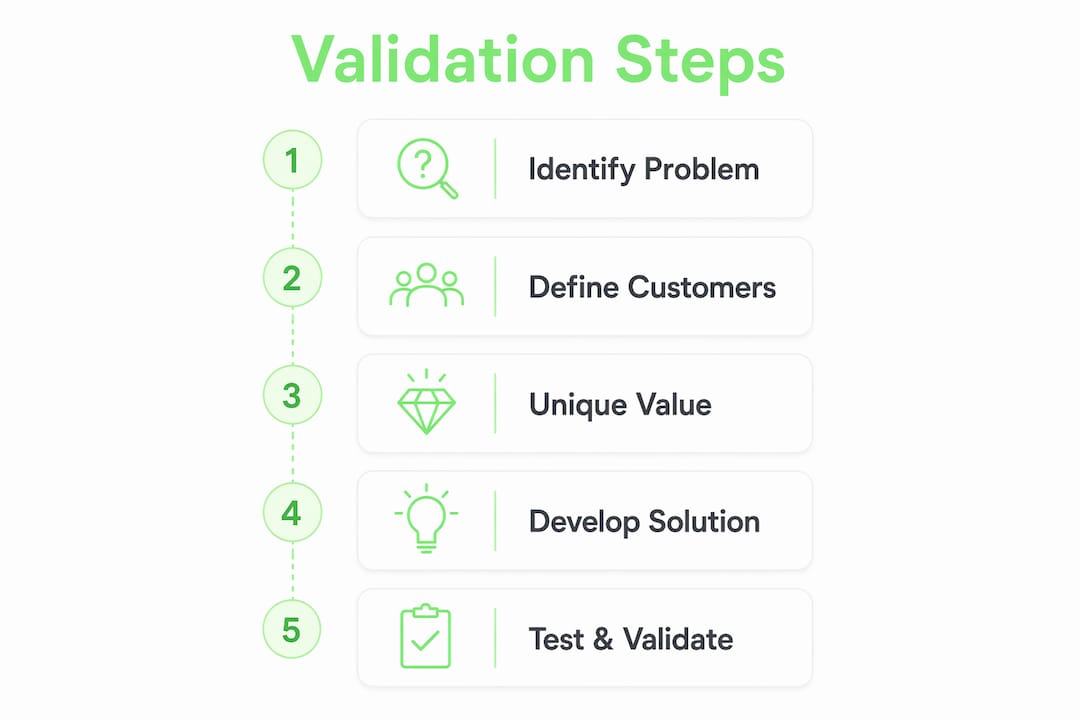
The recommended fill order starts with Problem and Customer Segments, then moves to UVP, Solution, Channels, Revenue, Costs, Key Metrics, and finally Unfair Advantage. This sequence forces you to confirm that a real problem exists before you describe your solution. Most founders do it backwards, which is why most founders build things nobody wants.
Follow these steps to complete your first canvas pass:
Define the Problem block first. Write three specific problems your customer faces. Include what they currently do instead of using your product, whether that is a spreadsheet, a manual process, or simply doing nothing.
Identify your Customer Segments. Name the specific person who feels the problem most acutely. “Small business owners” is not specific enough. “Solo founders running service businesses under $500K in annual revenue” is.
Write your UVP. State the measurable outcome your product delivers. Avoid technology descriptions. “Reduces customer churn by 20%” beats “GPT-4 powered retention tool” every time.
Describe your Solution. Limit it to three features that directly address the three problems you listed. No feature creep allowed here.
Map your Channels. Identify how you reach your customer segment today, not how you hope to reach them at scale.
Estimate Revenue and Costs. Include your AI inference cost per user per month as a line item.
Set Key Metrics. Choose one north-star metric that signals real customer value, not vanity metrics like page views.
Define your Unfair Advantage. This is the hardest block. If you cannot name something that cannot be easily copied, leave it blank and come back after your first ten customer interviews.
The canvas is a living document. When an assumption changes, you should be able to update the relevant blocks in under 15 minutes. If an update takes longer, your canvas is too complicated.
Pro Tip: After completing your first pass, circle the three blocks you feel least confident about. Those are your riskiest assumptions. Test them first, before anything else.
How do AI-powered tools enhance Lean Canvas creation and validation?
AI tools do not replace founder judgment. They surface what founder judgment misses.
A single Lean Canvas can contain 20 to 50 hidden assumptions that founders overlook during manual review. That is not a criticism of founders. It is a structural problem with how humans read their own work. We see what we intended to write, not what we actually wrote. AI tools read the canvas without that bias and flag assumptions you did not know you were making.
Here is where AI tools add the most value in the canvas process:
Assumption extraction. Feed your completed canvas into an AI tool and ask it to list every assumption embedded in each block. Expect 20 or more items on the first pass.
Risk ranking. Ask the AI to rank those assumptions by likelihood of being wrong and potential impact on the business model. This replaces hours of manual prioritization.
Interview question generation. Use AI to convert your riskiest assumptions into specific customer interview questions. This removes the blank-page problem from user research.
Fast prototyping prompts. AI tools can generate landing page copy, email scripts, and survey questions directly from your UVP block, letting you test messaging before you build anything.
Competitive framing. AI can help you articulate existing alternatives in the Problem block, which is the block most founders complete too quickly.
AI transforms the canvas from a static planning document into a dynamic system where changes in one block automatically surface implications for others. Update your pricing model and the AI flags three downstream effects on your cost and metric blocks. That is not magic. That is just good systems thinking, accelerated.
Understanding how AI analytics tools feed into business planning also helps founders set smarter Key Metrics from day one, particularly around brand signals and early traction indicators.
Pro Tip: Run your canvas through an AI tool twice: once after your first draft, and once after your first five customer interviews. The delta between those two passes will show you exactly how much your assumptions shifted.
Common pitfalls and best practices when applying Lean Canvas AI
The most common mistake is treating the Solution block like a product spec. Founders write “AI-powered recommendation engine” when they should write “reduces time spent on X from 4 hours to 20 minutes.” The block should describe an outcome, not a technology.
Successful AI canvases lead with business value, not technology descriptions. “GPT-4 powered” is not a value proposition. It is a feature. Your customer does not care how the engine works. They care what it does for them, specifically and measurably.
Watch for these pitfalls:
Ignoring existing alternatives. Failure to acknowledge the status quo is the leading reason AI projects fail to gain traction. Your Problem block must include what customers do today, including “nothing” as a valid option.
Leaving the Unfair Advantage block blank permanently. It is fine to leave it blank initially. It is a red flag if it stays blank after ten customer conversations. Proprietary data, exclusive partnerships, and deep domain expertise all qualify.
Treating the canvas as a one-time deliverable. A canvas you completed six months ago and never updated is a historical artifact, not a strategy tool.
Underestimating AI cost structure. Variable inference costs scale with usage. A unit economics model that works at 100 users can collapse at 10,000 users if you have not modeled token costs carefully.
The canvas works best as a learning system with feedback loops. When market feedback changes one block, trace the ripple effects across every connected block before your next planning session.
Pro Tip: Schedule a 15-minute “canvas review” every two weeks during early validation. Treat it like a standup meeting with your business model. Consistency here compounds fast.
Founders building AI lean startup strategies benefit most when they treat problem-solution fit as the primary goal of the canvas, not product completeness.
Key Takeaways
The Lean Canvas AI framework accelerates startup validation by forcing founders to test assumptions before building, using AI-specific blocks and tools to surface risks that traditional planning methods miss.
Point | Details |
|---|---|
Fill order matters | Start with Problem and Customer Segments before writing a single solution feature. |
AI-specific blocks are non-negotiable | Add Data Inputs, Integration/Workflow, and Testing blocks to capture real AI startup risks. |
Target the right gross margin | AI SaaS products should model for ~33% gross margin, not the 80% typical of standard SaaS. |
AI tools surface hidden assumptions | A single canvas can contain 20–50 assumptions founders miss without AI-assisted review. |
Treat it as a living document | Update your canvas in under 15 minutes whenever a key assumption changes during validation. |
Why most founders are using Lean Canvas AI wrong
Here is what I have observed working with early-stage founders: the canvas gets filled out once, shared in a Notion doc, and never touched again. That is not a Lean Canvas. That is a business plan with better formatting.
The real power of pairing AI tools with the Lean Canvas framework is speed of learning, not speed of completion. A founder who updates their canvas after every five customer conversations and uses AI to surface new assumptions is compressing months of trial and error into weeks. That compression is the actual competitive advantage, not the canvas itself.
What surprises most founders is how quickly the Unfair Advantage block becomes their most valuable asset. Not because they filled it in correctly on day one, but because the discipline of returning to it repeatedly forces them to articulate what is genuinely defensible about their position. That clarity changes how they pitch, hire, and prioritize.
The uncomfortable truth is that most AI startup failures are not technical failures. They are assumption failures. The technology worked. The founders just validated the wrong things in the wrong order. The Lean Canvas AI framework, used as a living operating system rather than a one-time exercise, is the most practical antidote to that pattern I have seen.
— Samim
Siift’s approach to canvas-based startup validation
Siift is built specifically for founders who want to apply Lean Canvas AI methods without the guesswork of assembling a DIY toolkit. The platform guides you step by step through ideation, assumption mapping, and validation in a single workflow. You get structured canvas creation, AI-assisted assumption extraction, and rapid iteration built into the same experience. No switching between tools. No losing context between sessions. If you are ready to test your idea before committing months of work to it, validate before you build with Siift’s guided process. It is the fastest path from “I have an idea” to “I know if this idea is worth building.”
FAQ
What is Lean Canvas AI?
Lean Canvas AI is a one-page, nine-block business model framework adapted for AI startups, completed in 60–90 minutes. It adds blocks for Data Inputs, Integration/Workflow, and Testing to capture risks unique to AI products.
How does Lean Canvas AI differ from Business Model Canvas AI?
The Business Model Canvas covers nine blocks focused on established businesses, while Lean Canvas AI is designed for early-stage validation, prioritizing problem-solution fit and assumption testing over operational detail.
What fill order should I use for a Lean Canvas AI?
Start with Problem and Customer Segments, then move to UVP, Solution, Channels, Revenue, Costs, Key Metrics, and Unfair Advantage. This sequence confirms a real problem exists before you describe any solution.
How often should I update my Lean Canvas AI?
Update it in under 15 minutes whenever a key assumption changes. A canvas that has not been updated since your first draft is no longer a strategy tool.
What gross margin should AI startups target in their canvas?
AI SaaS startups should model for approximately 33% gross margin on AI features, significantly lower than the 80% typical of standard SaaS, because variable inference and token costs reduce margins continuously.