

Record the task, transcribe it into an SOP, pilot it with someone who’s never touched it before, then automate whatever stays stable. That’s the whole playbook. Most founders skip straight to automation and wonder why their Zaps break every other week. The fix is sequencing: document first, test second, automate last.
Here’s your next 72 hours:
- Hour 1-2: Pick one repeatable task and record yourself doing it (Loom or Descript).
- Hour 3-4: Transcribe with Otter.ai, then draft a one-page SOP in Notion.
- Day 2: Hand it to a new hire or contractor with zero context. Watch, don’t help.
- Day 3: Fix what broke, then flag steps worth automating with Zapier or Make.
Pro Tip: Building one solid routine, start to pilot, usually takes 60 to 180 minutes. If it’s taking longer, your task is too big. Split it.
For structured guidance on which flows deserve this treatment first, siift New Business OS bakes prioritization logic straight into its playbooks, so you’re not guessing.
Key Takeaways
Building a routine that survives real use means documenting it visually, testing it on a stranger, and automating only the steps that hold up under repetition.
| Point | Details |
|---|---|
| Document with screen capture | Record the task live in Loom or Descript instead of writing from memory. |
| Keep SOPs to one page | Short, specific, testable SOPs get followed; long ones get ignored. |
| Run the cold-start test | Hand the SOP to someone new and stay silent while they work through it. |
| Prioritize by frequency and risk | Start with high-frequency, high-founder-time tasks like onboarding and sales follow-up. |
| Automate only stable steps | Use Zapier or Make after a manual process proves reliable, and let siift New Business OS guide which routines to validate and systematize first. |
Table of Contents
- How to Create Routines: A Step-by-Step Method
- How Do You Document Routines Quickly?
- Which Routines Should You Build First?
- What AI and Automation Actually Belong in a Routine?
- How Do You Test a New Routine Before Trusting It?
- What Mistakes Do Founders Make Building Routines?
- How siift Turns Routines Into Repeatable Growth
- Sources
- FAQ
How to Create Routines: A Step-by-Step Method
Building a routine isn’t about writing a beautiful document. It’s about creating something a stranger can execute without pinging you on Slack. Here’s the sequence that works.
- Select the process by founder-time impact. Ask: what am I doing weekly that isn’t strategic? Onboarding, invoicing, sales follow-up, these bleed hours you don’t have.
- Map the steps while you do it, not after. Memory lies. Screen-record the task live and narrate your decisions out loud, including the judgment calls.
- Capture the edge cases. What happens when a customer doesn’t respond? What if the invoice bounces? Bolt these onto the main flow as “if this, then that” branches.
- Add quality checkpoints. Insert a moment where the person doing the task confirms they got the expected output before moving forward.
Every SOP needs the same skeleton, regardless of the task:
- Title and owner
- Prerequisites (access, tools, permissions needed)
- Inputs (what triggers this routine)
- Numbered steps
- Quality checkpoints
- Known exceptions
- Links to relevant tools or docs
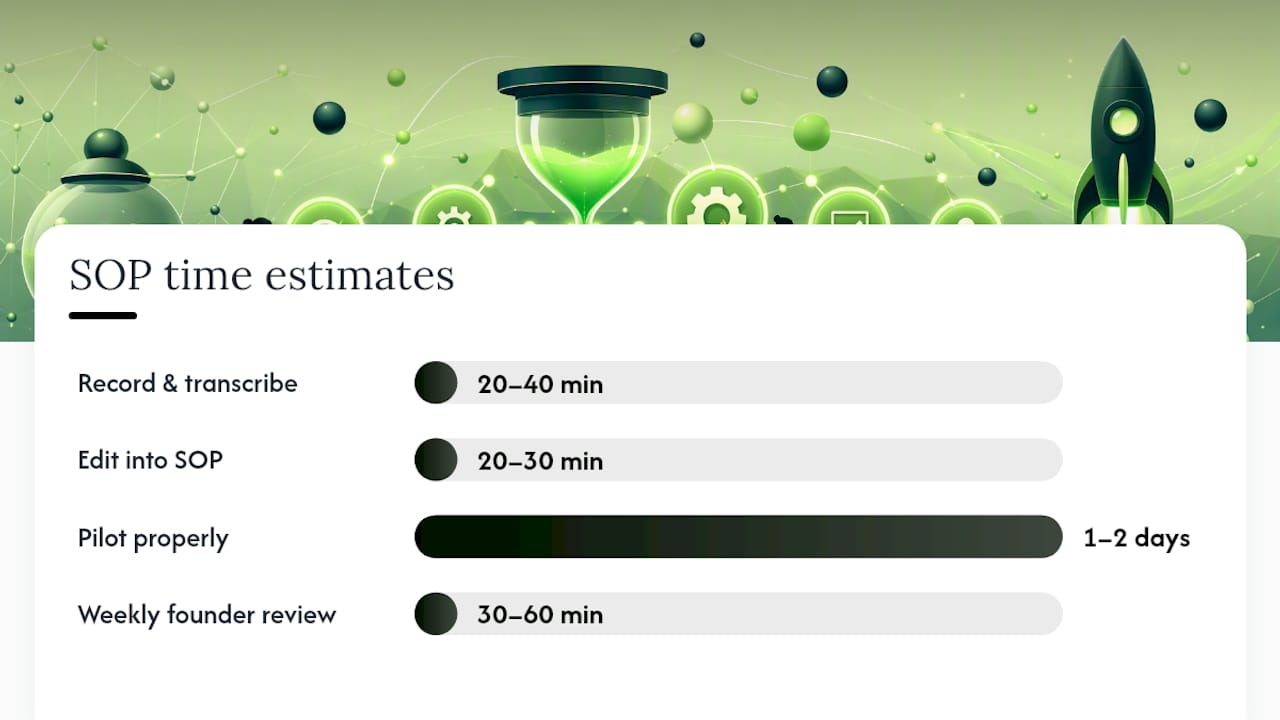
Time-wise, expect 20 to 40 minutes to record and transcribe, 20 to 30 minutes to edit into a clean SOP, and another day or two to pilot it properly. A weekly founder review of 30 to 60 minutes is the minimum viable ritual holding all of this together; skip it and drift creeps in fast.
Pro Tip: Draft screen-capture-first. Writing an SOP from memory misses the small decisions you make without noticing. Recording forces you to externalize them, and running a cold-start test with a new hire, someone who’s never seen the task, exposes every assumption you didn’t know you were making.
How Do You Document Routines Quickly?
The fastest path from “I do this in my head” to “anyone can do this” runs through three tools, not a blank Google Doc.
Record the task in Loom or Descript. Transcribe it with Otter or Descript’s built-in transcription. Edit the transcript into a structured SOP inside Notion, where it lives next to your task board instead of buried in a drive folder.
| Tool | Role |
|---|---|
| Loom / Descript | Screen capture of the live task |
| Otter.ai | Transcription into editable text |
| Notion | Final SOP home, linked to workflows |
A good SOP is short, specific, testable, and findable, one page, written like a recipe. Example: “Customer Refund Request: Owner, Support Lead. Trigger: refund email received. Steps: verify order in Stripe, confirm reason matches policy, issue refund, log in spreadsheet, send confirmation template. Checkpoint: confirm refund shows in customer’s account within 24 hours.”
Pro Tip: Store SOPs where the work happens: embedded in the task card, pinned in the relevant Slack channel, or linked directly from your Notion workflow. An SOP nobody can find is worse than no SOP.
Which Routines Should You Build First?
Not every task deserves documentation on day one. Prioritize by frequency, how much founder time it eats, the risk if it breaks, and whether it involves a handoff to someone else. High frequency and high founder time drain is your top-left quadrant, tackle that first.
- Onboarding: Frees hours per new customer or hire and reduces early churn from bad first impressions.
- Monthly close: Reduces risk of cash surprises; ties directly to runway visibility.
- Sales follow-up: Recovers deals that die from simple neglect, not rejection.
- Incident response: Cuts resolution time and prevents a single outage from becoming a trust crisis.
| Routine | Frequency | Founder Time Drain | Risk If Skipped |
|---|---|---|---|
| Onboarding | High | High | Medium |
| Monthly close | Monthly | Medium | High |
| Sales follow-up | High | High | Medium |
| Incident response | Low | Low | High |
One operations guide recommends picking three critical flows and defining numeric success metrics for each before building anything else, rather than documenting everything at once.
What AI and Automation Actually Belong in a Routine?
Don’t automate a process you don’t understand yet. Run it manually first, watch where it breaks, then automate only the steps that stay stable across five or six repetitions. Automating a wobbly process just scales the wobble.
Here’s how the toolset divides up:
- Notion: Documentation and lightweight databases for tracking SOP status.
- Zapier or Make: Connects stable, repetitive steps once they’re proven (new signup triggers a welcome sequence, for example).
- Descript / Otter.ai: Transcription that turns spoken walkthroughs into editable text.
- Loom: Capture layer for the initial recording.
- siift New Business OS: Agentic orchestration, guided playbooks, and validation prompts that sit on top of the manual work, flagging which routines are ready for automation and which still need a human in the loop.
A typical workflow: capture the task in Loom, transcribe with Otter.ai, draft the SOP in Notion, tag which steps are good candidates for automation, then build the Zap or Make flow for those steps only. This business process automation guide breaks down how this scales from a two-person shop to a larger operation without the automation outrunning the process it’s supposed to support.
Pro Tip: If a step still requires judgment calls, it’s not ready for a Zap. Keep it manual one more cycle.
How Do You Test a New Routine Before Trusting It?
A pilot proves the SOP works before you bake it into your business. Run it short and specific.
- Set a timeline. Simple tasks: 48 to 72 hours. More involved routines: 7 to 21 days.
- Track the right metrics. Time-to-complete, error rate, number of clarifying questions asked, cycle time, and any support escalations.
- Run the cold-start test. Hand the SOP to someone who’s never done the task and don’t answer questions while they work through it. Every hesitation is a missing step.
- Interpret the result. Pass means they finish with zero or one clarifying question. Fail means multiple stalls, revise the SOP and rerun.
- Set a review cadence. Revisit each SOP every 90 days, version it, and prune what’s stopped earning its keep.
- Quick pilot: 48-72 hours
- Standard pilot: 7-21 days
- Review cycle: every 90 days
Pro Tip: Silence is the diagnostic during a cold-start test. The moment you jump in to explain something, you’ve hidden the exact gap you needed to find.
What Mistakes Do Founders Make Building Routines?
Most routine failures come from a handful of repeat offenses.
- Over-documenting. A ten-page SOP for a five-minute task guarantees nobody reads it. Fix: cap it at one page.
- Automating too early. A Zap built on an unstable process just breaks faster and louder. Fix: run it manually for a few cycles first.
- Burying SOPs in a random doc folder. If people can’t find it, they’ll wing it. Fix: embed it in the workflow itself.
- Writing for insiders. SOPs written with tribal shorthand fail the moment a new person reads them. Fix: write for a smart stranger, then test immediately.
A short example
Don’t: “Handle the refund like usual.” Do: “Verify order number in Stripe, check refund policy match, issue refund, log it, send confirmation email.”
Pro Tip: If your SOP needs a verbal explanation to make sense, it’s not done yet.
Why routines free founders from bottlenecks
Every founder bottleneck I’ve seen traces back to one thing not being written down. The moment a task lives only in someone’s head, that person becomes a single point of failure, usually the founder. Documenting it, then handing it to someone cold, exposes exactly where the process depends on undocumented judgment. That’s the whole value of the cold-start test paired with screen-capture-first documentation: it turns invisible expertise into something transferable.

How siift Turns Routines Into Repeatable Growth
Documenting a routine is step one. Actually knowing which routines matter, and validating them before you sink hours into automation, is where most founders lose momentum. That’s the gap siift New Business OS closes. Instead of generic AI chat where you’re guessing what to ask, siift walks you through guided playbooks that flag which flows are worth systematizing and which validation steps come first.
It connects naturally with the tools already in your stack, Loom and Descript for capture, Notion for storage, Zapier and Make for the automations you build once a process proves stable. The agentic layer runs validation prompts in the background, so you’re not burning founder hours re-deciding what to prioritize every week.
If you’re trying to figure out which routines to build around a go-to-market push, siift’s go-to-market planning tools map that out for you. Ready to see it on your own idea? Start here.
Sources
Start with the tools that match each stage of the workflow: Loom or Descript for capture, Otter.ai for transcription, Notion for the finished SOP, and Zapier or Make for automating the steps that have proven stable.
For the operational reasoning behind sequencing and cadence, the EntrepreneurBible startup operations guide covers minimum-viable processes and weekly review rhythms. Founder’s Best Friend’s SOP guide breaks down what makes an SOP testable. For scaling automation without breaking things, the operations management deep dive is worth a read.
For founder-specific practices beyond routines, siift’s best practices guide rounds out the picture.
- Startup Operations — Cadences, Tools, and Minimum Viable Processes | EntrepreneurBible
- Advanced Operations Management For Startups: Systems That Actually Scale - SoftwareMentors
FAQ
How Long Does It Take to Create a Routine?
Most single routines take 60 to 180 minutes from recording to a pilot-ready SOP, depending on task complexity.
What’s the Fastest Way to Document a Routine?
Screen-record the task in Loom or Descript, transcribe it with Otter.ai, then edit the transcript into a one-page SOP in Notion.
What Is the Cold-Start Test?
It’s handing an SOP to someone who’s never done the task and watching them attempt it without help; every hesitation reveals a missing step.
Which Routines Should Founders Build First?
Start with high-frequency, high-founder-time tasks like onboarding, sales follow-up, monthly close, and incident response.
When Should You Automate a Routine?
Only after the manual process has run reliably for several cycles; automating an unstable process just scales the errors. Tools like siift New Business OS help flag which routines are validated and ready for automation triggers.