

TL;DR:
- A modern Lean Canvas is a one-page hypothesis sheet that helps startups test nine core assumptions quickly and iteratively. It emphasizes a fill order that starts with customer segments and problems to prevent solution bias, guiding founders through rapid, focused experiments before building solutions. Using tools like siift speeds up validation and promotes continuous updates, reducing wasted effort and fostering a learning-driven approach.
A modern Lean Canvas is a one-page hypothesis sheet that replaces your business plan with nine testable assumptions you can draft in 20–30 minutes and update after every customer conversation. This guide gives you everything you need to run that session.
Here’s what you’ll walk away with:
- A recommended fill order that prevents solution-first bias
- A minute-by-minute 30-minute workshop agenda with facilitator prompts
- Three annotated canvas examples with riskiest assumptions called out
- Experiment templates tied to each canvas block
- Tool recommendations for remote, async, and in-person sessions
Table of Contents
- What is the modern Lean Canvas and how does it differ from the Business Model Canvas?
- The nine Lean Canvas blocks: what to write and what to test first
- What fill order de-risks your canvas the fastest?
- How to run a 30-minute Lean Canvas workshop right now
- Three annotated Lean Canvas examples worth studying
- Common mistakes founders make with the Lean Canvas
- How to validate riskiest assumptions with experiments and metrics
- Where to find modern Lean Canvas templates and tools
- How agentic AI can accelerate your Lean Canvas validation
- Key Takeaways
- The canvas is a conversation, not a deliverable
- siift turns your canvas hypotheses into tested strategy
- Useful sources and further reading
- FAQ
What is the modern Lean Canvas and how does it differ from the Business Model Canvas?
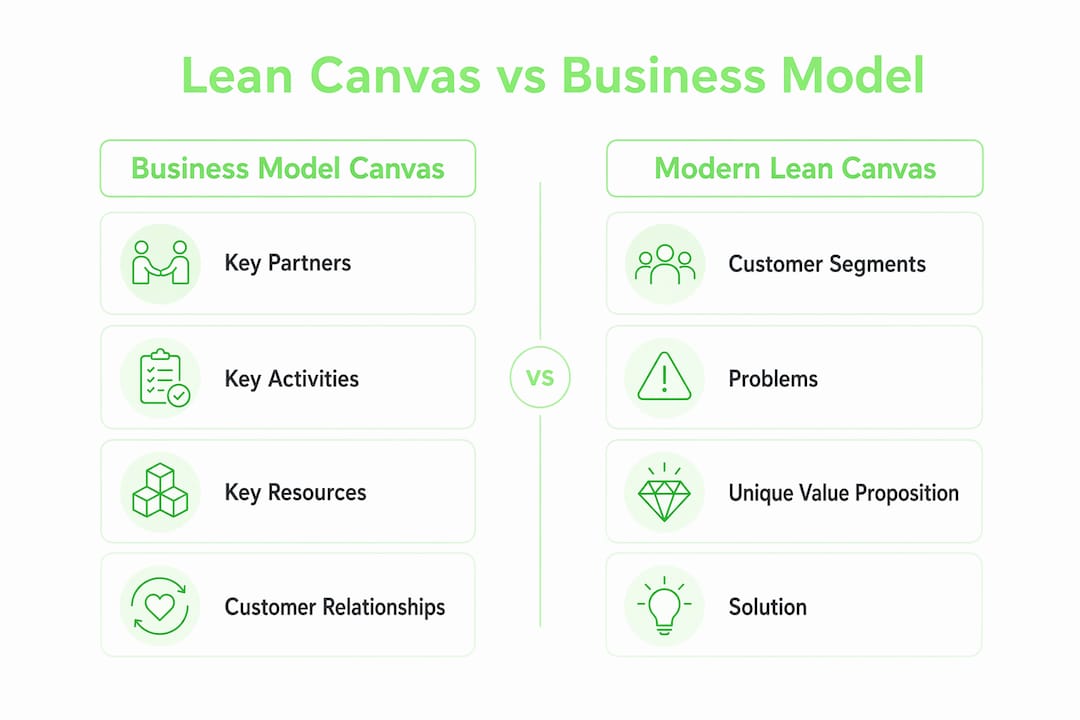
Ash Maurya built the Lean Canvas in 2012 as a direct adaptation of Alexander Osterwalder’s Business Model Canvas, published through Strategyzer. Maurya’s insight was simple but sharp: the Business Model Canvas was designed for established companies documenting a working model, not for early-stage founders who don’t yet know if their problem is real. So he swapped four blocks to surface startup-specific risks faster.
The four swapped blocks tell the whole story. Key Partners, Key Activities, Key Resources, and Customer Relationships — all enterprise operations blocks — were replaced with Problem, Solution, Key Metrics, and Unfair Advantage. Those replacements force you to answer the questions that actually kill startups: Is this a real problem? Can we measure traction? What makes us defensible?
Leanstack, Maurya’s platform, continues to maintain and evolve the framework. You can think of the Lean Canvas as the Business Model Canvas with its enterprise scaffolding stripped out and a validation engine bolted in.
| Dimension | Business Model Canvas (Strategyzer) | Lean Canvas (Leanstack) |
|---|---|---|
| Created by | Alex Osterwalder | Ash Maurya |
| Best for | Established businesses, documented models | Pre-PMF startups, unvalidated ideas |
| Unique blocks | Key Partners, Key Activities, Key Resources, Customer Relationships | Problem, Solution, Key Metrics, Unfair Advantage |
| Primary purpose | Map how a business operates | Surface and falsify riskiest assumptions |
| Time to complete | Hours to days | 20–30 minutes |
| Update cadence | Quarterly or when strategy shifts | After every major experiment or interview |
Use the Business Model Canvas once you have product-market fit and need to communicate a working model to investors or partners. Before that point, the Lean Canvas is the right tool.
The nine Lean Canvas blocks: what to write and what to test first
Each block is a hypothesis, not a fact. Write short, specific entries. If you’re writing paragraphs, you’re writing a business plan.
-
Problem. List the top three problems your customer segment faces. Pitfall: listing symptoms instead of root causes. Validation prompt: Can you find ten people who describe this problem unprompted in a 15-minute interview?
-
Customer Segments. Name a specific, reachable group — not “small businesses” but “solo freelance designers billing under $5K/month.” Pitfall: defining segments so broadly that no single outreach channel reaches them. Validation prompt: Can you name five real people in this segment you could call this week?
-
Unique Value Proposition. One sentence that states the outcome you deliver and for whom. Pitfall: writing a tagline instead of a promise. Validation prompt: Does a cold prospect immediately understand what changes for them?
-
Solution. Three features — maximum — that directly address the top three problems. Pitfall: listing a full product roadmap. Validation prompt: Can a concierge MVP (you doing it manually) deliver this solution before you write a line of code?
-
Channels. How you reach customers to acquire and deliver. Pitfall: listing “social media” with no specificity. Validation prompt: Which single channel can you test with $0 and a week of effort?
-
Revenue Streams. How you charge and at what price point. Pitfall: leaving this blank because “we’ll figure it out later.” Validation prompt: Will someone hand you a credit card for this today?
-
Cost Structure. Fixed and variable costs to deliver the solution. Pitfall: underestimating customer acquisition cost. Validation prompt: At your target price, what’s the minimum volume to break even?
-
Key Metrics. The one number that tells you the business is working. Pitfall: tracking pageviews or signups instead of activation or retention. Validation prompt: If this metric doubles, does revenue follow?
-
Unfair Advantage. Something competitors cannot easily copy: proprietary data, a network effect, a unique distribution relationship. Pitfall: writing “passion” or “great team.” Validation prompt: Would a well-funded competitor struggle to replicate this in 12 months?
Pro Tip: Cap your Solution block at three features and write your UVP as a single sentence. If you can’t do either, that’s the signal — test before you build, not after.
What fill order de-risks your canvas the fastest?
Start here: Customer Segments → Problems → UVP → Solution → Key Metrics → Revenue Streams → Channels → Cost Structure → Unfair Advantage.
That sequence is not arbitrary. Practitioner guidance consistently recommends anchoring on who and what before moving to how and how much. The logic is that every other block is downstream of the customer-problem pair. If you get that pair wrong, a polished solution, a clever pricing model, and a slick channel strategy are all wasted work.
The failure mode this order prevents has a name: solution leakage. It happens when founders fill in Solution first because it’s the most exciting block, then reverse-engineer a customer and problem to justify it. The canvas looks complete, but it’s built on an untested assumption that the problem is real. Spending the bulk of your initial time on Customer Segments and Problems is the single highest-leverage move you can make.
Here’s a rough time budget for a first draft:
- Customer Segments + Problems: the biggest portion (the anchor; don’t rush it)
- UVP + Solution: a moderate time
- Key Metrics + Revenue Streams: less time
- Channels + Cost Structure + Unfair Advantage: least time
Initially, run experiments against the first two blocks only. Problem and Customer Segment assumptions are the riskiest and the cheapest to test. Everything else can wait until you have at least five customer interviews confirming the problem is real and the segment is reachable.
Pro Tip: Write your Customer Segment and Problem blocks on sticky notes first, separate from the canvas. Debate them out loud before committing anything to the page. That five-minute argument is worth more than an hour of solo drafting.
How to run a 30-minute Lean Canvas workshop right now
Best-practice guides recommend a rapid first draft in 20–30 minutes. Spending more than 45 minutes usually means you’ve slipped into business-plan mode. Here’s a workshop that keeps you honest.
Pre-work (before the session):
- Invite 2–4 people: at least one person who has talked to potential customers and one who understands the technical or operational side.
- Bring any existing customer notes, survey responses, or support tickets.
- Open a shared canvas in Miro, Notion, or Google Slides — or print a blank template. Atlassian’s Confluence template works well for teams already in that ecosystem.
The 30-minute agenda:
-
Minutes 0–2: Frame the session. Facilitator states the rule: every entry is a hypothesis, not a fact. No paragraphs. No roadmaps. Short, specific, falsifiable.
-
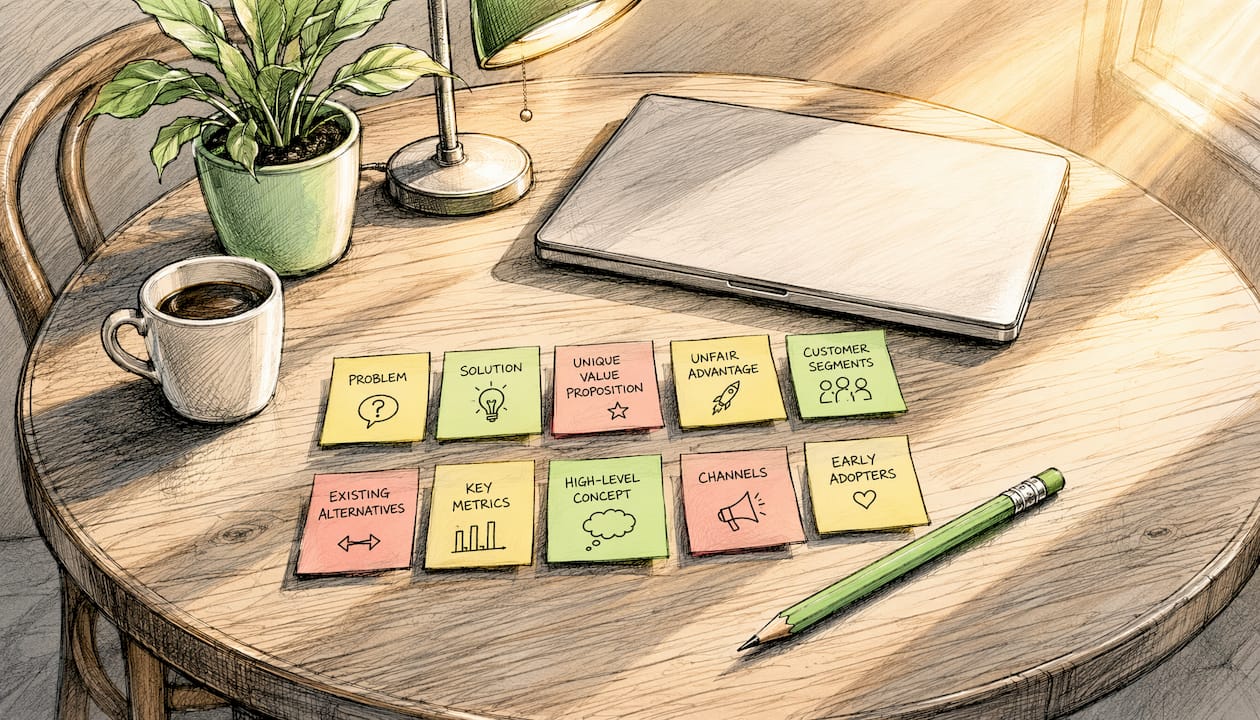
Minutes 2–10: Customer Segments and Problems. Each participant writes their top customer segment on a sticky note. Discuss, converge on one primary segment. Repeat for the top three problems. Facilitator prompt: “Who specifically wakes up frustrated by this, and what does that frustration cost them?”
-
Minutes 10–16: UVP and Solution. Draft the UVP as a single sentence. List three solution features — no more. Facilitator prompt: “What’s the one outcome the customer pays for, not the feature that delivers it?”
-
Minutes 16–22: Key Metrics and Revenue Streams. Name one metric that proves the business is working. Set a price or pricing model. Facilitator prompt: “If we had 100 customers tomorrow, what number would tell us this is real?”
-
Minutes 22–27: Channels, Cost Structure, and Unfair Advantage. Move fast here. One channel to test first, a rough cost estimate, and one honest answer about defensibility. Facilitator prompt: “What do we have that a well-funded copy-cat would struggle to replicate?”
-
Minutes 27–30: Riskiest assumption check. The team votes on the single riskiest assumption on the canvas. Circle it. That’s the first experiment. Assign an owner and a deadline before anyone leaves the room.
What success looks like at minute 30: A completed canvas with every block filled in one to three bullet points, one circled riskiest assumption, and one named owner for the first experiment. If you have that, the session worked.
Three annotated Lean Canvas examples worth studying
Example 1: B2B SaaS for freelance accountants
Context: A two-person team building invoicing software for solo CPAs.
Riskiest assumption: That freelance accountants lose meaningful revenue to late payments and would pay a monthly fee to automate follow-ups.
UVP: “Get paid 14 days faster without chasing clients manually.”
Key metric: Average days-to-payment for active users vs. their pre-signup baseline.
First experiment: A concierge MVP — the founders manually send payment reminders on behalf of five volunteer accountants for two weeks, then measure whether average payment time drops.
Outcome: Three of five accountants saw faster payments. Two said the problem wasn’t late payments but client onboarding friction. The canvas was updated: Customer Segment narrowed to “freelance CPAs with 10+ recurring clients,” and a new Problem block entry was added for onboarding complexity.
Example 2: Consumer wellness app
Context: Solo founder building a sleep-tracking app for shift workers.
Riskiest assumption: That shift workers want data-driven sleep advice, not just an alarm clock.
UVP: “Sleep schedules built around your rotating shifts, not a 9-to-5 world.”
Key metric: 7-day retention after first sleep plan generated.
First experiment: A landing page with a waitlist and a one-paragraph description of the core benefit. If fewer than 5% of visitors sign up, the UVP needs reworking before any code is written.
Outcome: Conversion was low, but qualitative responses revealed shift workers wanted schedule-sharing with family members. The canvas pivoted: a new channel (workplace HR portals) and a revised UVP emphasizing family coordination were added in the next iteration.
Pro Tip: The example that changes the most after the first experiment is the most honest canvas. A canvas that never gets updated isn’t a living tool — it’s a wall decoration.
Example 3: Marketplace for local repair services
Context: Three-person team connecting homeowners with vetted appliance repair technicians.
Riskiest assumption: That homeowners will pay a booking fee rather than calling a technician directly.
UVP: “A vetted repair tech at your door in under four hours, or your booking fee back.”
Key metric: Repeat booking rate within 90 days.
First experiment: A manual matching process — the founders take bookings via a simple form and personally call technicians to schedule. No platform code. If ten bookings happen in two weeks, the demand hypothesis holds.
Outcome: Demand was real, but technicians were the bottleneck. The canvas was updated to treat technician acquisition as a parallel customer segment, with its own Problem and UVP block.
Common mistakes founders make with the Lean Canvas
-
Solution leakage. Filling in Solution before validating the problem. Fix: Cover the Solution block with a sticky note until the Problem and Customer Segment blocks are locked. Only uncover it after you’ve had at least three customer conversations.
-
Vague customer segments. Writing “millennials” or “small businesses.” Fix: Add a behavioral qualifier: “millennials who cook at home five or more times per week and spend over $100/month on groceries.” If you can’t describe a behavior, you can’t find the person.
-
Skipping Key Metrics and Unfair Advantage. These are the blocks most often left blank or filled with platitudes. Fix: Key Metrics gets one number only. Unfair Advantage gets one honest sentence — if you don’t have one yet, write “none yet” and treat finding one as a strategic priority.
-
Treating the canvas as a final plan. Printing it, framing it, and never touching it again. Fix: Schedule a 15-minute canvas review after every five customer interviews or every major experiment result.
-
Overcomplicating the Solution block. Listing twelve features because the product does twelve things. Fix: The Solution block describes the minimum viable version, not the full roadmap. Three features. That’s the rule.
Pro Tip: Treat the canvas as disposable. The goal isn’t a perfect document — it’s a faster path to a falsified assumption. Update it after every meaningful customer interaction, even if the update is just crossing something out.
How to validate riskiest assumptions with experiments and metrics
The Build→Measure→Learn loop only works if you choose the right metric before you run the experiment. Guidance from practitioners consistently points to one North Star metric per stage and warns against vanity metrics like total signups or social followers, which can look good while the business is dying.
Here’s a practical experiment map:
| Canvas block | Experiment type | Signal of success | Typical timeline |
|---|---|---|---|
| Problem | Customer discovery interviews (5–10) | 7 of 10 describe the problem unprompted | 1–2 weeks |
| Problem | Problem validation landing page | 5%+ email signup rate from cold traffic | 1 week |
| Solution | Concierge MVP (manual delivery) | Customer pays or commits to pay | 2–3 weeks |
| Solution | Clickable prototype | Task completion rate above 60% in usability test | 1 week |
| Revenue Streams | Pricing page with payment option | At least one real transaction | 1–2 weeks |
| Channels | Single-channel acquisition test | Cost per lead below target threshold | 2 weeks |
| Key Metrics | Cohort retention analysis | Week-2 retention above baseline for the category | 4 weeks |
For instrumentation, keep it simple early. A Google Form, a Stripe payment link, and a spreadsheet can measure most of these signals before you need analytics infrastructure. The goal is a real signal, not a perfect dashboard.
One principle worth anchoring to: if your North Star metric doesn’t move when you deliver the core value, the problem or the segment is wrong. That’s the canvas telling you to iterate, not the product.
Where to find modern Lean Canvas templates and tools
The right tool depends on how your team works, not which platform has the most features.
-
Miro is the strongest choice for live, synchronous workshops. Its Lean Canvas template supports real-time sticky notes, voting, and timer features that map directly to the 30-minute agenda above. Best for: distributed teams running a facilitated session together.
-
Notion wins for async iteration and version history. You can embed a canvas table, add comments per block, and link experiment results directly to the assumption they tested. Best for: solo founders or small teams who update the canvas incrementally between customer calls.
-
Google Slides is the lowest-friction option for teams that need a printable or shareable snapshot. No learning curve, easy to export, and simple enough that a non-technical co-founder won’t complain. Best for: early conversations with advisors or investors who want a quick visual.
-
Atlassian Confluence offers a dedicated Lean Canvas template that integrates with Jira for teams already in that ecosystem. Best for: product teams that want to connect canvas hypotheses directly to sprint work.
-
Printable PDFs still have a place. A printed canvas on a whiteboard wall during an in-person sprint creates a shared physical artifact that remote tools can’t replicate. Leanstack’s site offers a downloadable version, and a quick search for “Lean Canvas PDF template” surfaces several clean options.
Whichever tool you pick, choose one that preserves fill order and lets you timestamp updates. A canvas with no version history is just a snapshot. A canvas with dated iterations is a learning log.
How agentic AI can accelerate your Lean Canvas validation
The slowest part of the Lean Canvas process isn’t filling in the blocks — it’s the gap between writing a hypothesis and getting evidence to confirm or kill it. That’s exactly where agentic AI earns its keep.
Here’s where AI genuinely shortens the loop. For problem discovery, AI can synthesize patterns across hundreds of customer reviews, Reddit threads, and support tickets in minutes, surfacing the language real customers use to describe their pain. That’s input you’d normally spend days gathering. For experiment design, AI can generate interview scripts, landing page copy variants, and pricing test structures from your canvas inputs, cutting setup time from days to hours. For metric synthesis, an AI layer can track experiment results across blocks and flag when a signal is strong enough to update the canvas.
siift’s New Business OS is built specifically for this workflow. Instead of dropping a blank canvas in front of you and wishing you luck, siift guides you through ideation, validation, and go-to-market as a structured, step-by-step process. The platform connects AI-assisted validation directly to canvas outputs, so your experiment results feed back into the hypothesis you’re testing, not into a separate spreadsheet you’ll forget to check.
The advantages of an AI-augmented canvas are real, but there’s one thing AI cannot replace: the qualitative customer interview. No model can replicate the moment a customer says something that completely reframes your Problem block. AI surfaces patterns; founders interpret meaning.
Pro Tip: Use AI to generate your first draft of every canvas block based on market data, then stress-test each entry with a real customer conversation. The AI draft gives you a starting point; the conversation tells you what to cross out.
Key Takeaways
The modern Lean Canvas works because it forces founders to articulate falsifiable hypotheses before writing a line of code, and the recommended fill order — Customer Segments first, Solution last — is the single structural choice that prevents the most common and costly startup mistake.
| Point | Details |
|---|---|
| Fill order prevents bias | Start with Customer Segments and Problems; fill Solution only after validating the customer-problem pair. |
| 30 minutes is the ceiling | A first draft should take 20–30 minutes; more than 45 minutes means you’re writing a plan, not hypotheses. |
| One metric per experiment | Pick a single North Star metric per block test; avoid vanity metrics like signups or pageviews. |
| Update after every experiment | Treat the canvas as a living document; schedule a 15-minute review after every five customer interviews. |
| siift accelerates the loop | siift’s New Business OS connects canvas outputs to experiment workflows, shortening the build→measure→learn cycle. |
The canvas is a conversation, not a deliverable
Here’s a candid take: the most valuable thing the Lean Canvas ever did for a product team wasn’t the document itself. It was the argument that happened while filling it in.
The moment two co-founders disagree about who the customer is, or a product manager and an engineer can’t agree on the top problem, the canvas has already done its job. It’s made a hidden assumption visible. That argument, uncomfortable as it is, is worth more than a polished slide deck. The canvas is a conversation-starter disguised as a planning tool.
What I’d push back on is the tendency to treat the first canvas as a milestone. Teams celebrate completing it, share it with advisors, and then let it sit. The canvas that never gets updated is the one that fails you. The teams that get the most out of it are the ones who treat it as almost embarrassingly disposable — scribbling on it, crossing things out, rewriting the UVP after a single customer call that changed everything. That’s not sloppiness. That’s the methodology working.
Keep the canvas alive without creating overhead by linking it to a simple trigger: every time you finish a customer interview or an experiment produces a result, spend five minutes asking whether any block needs to change. Not a meeting. Not a retrospective. Five minutes. That cadence is what separates a living hypothesis from a wall decoration.
siift turns your canvas hypotheses into tested strategy
Most founders finish their first canvas and then stare at it, unsure what to do next. siift is built for exactly that moment. The platform takes your canvas outputs and connects them to structured experiment workflows, so you move from hypothesis to evidence without the usual chaos of figuring out what to test first or how to measure it.
Three things siift does that a blank canvas can’t:
- Faster evidence: AI-assisted problem discovery surfaces customer language and market signals before your first interview, so you walk in with sharper questions.
- Fewer blind spots: The guided workflow filters out the biases and assumptions that make founders fall in love with their solution before validating the problem.
- Repeatable experiment flows: Every canvas block maps to a pre-built experiment template, so you’re not reinventing the process each time you iterate.
Ready to run your first validated canvas? Start your validation workflow on siift and go from idea to testable hypothesis in 20–30 minutes.
Useful sources and further reading
- Leanstack blog — Lean Canvas vs Business Model Canvas: Ash Maurya’s own explanation of why he made the four block swaps; the primary source for the comparison table above.
- Groundwork — Lean Canvas template guide: Practical guidance on treating the canvas as a living tool and the 20–30 minute drafting standard.
- FourWeekMBA — Lean Startup Canvas: Covers the recommended fill order and the Build→Measure→Learn loop with metric selection guidance.
- Miro — What is a Lean Canvas?: Tool-specific guidance and a ready-to-use workshop template for synchronous sessions.
- Atlassian Confluence — Lean Canvas template: Best for product teams who want to connect canvas blocks to sprint and project workflows.
- Visual Paradigm — 5 Common Lean Canvas Mistakes: A concise breakdown of the errors most likely to make a canvas useless.
- Ideaplan — Lean Canvas framework: A clean overview of all nine blocks with format guidance for each.
- siift — Lean Canvas advantages for founders: Internal resource covering why the Lean Canvas fits early-stage startup environments specifically.
- siift — Understanding Lean Canvas: A longer-form companion guide for founders who want deeper coverage of each block.
FAQ
What are the nine parts of a Lean Canvas?
The nine blocks are Problem, Customer Segments, Unique Value Proposition, Solution, Channels, Revenue Streams, Cost Structure, Key Metrics, and Unfair Advantage. Each block represents a testable hypothesis about your business model.
What are the most common mistakes in a Lean Canvas?
The most frequent errors are solution leakage (filling Solution before validating the problem), vague customer segments, and skipping Key Metrics and Unfair Advantage or leaving them blank. Each reduces the canvas from a validation tool to a decoration.
How long should a Lean Canvas take to fill in?
A first draft should take 20–30 minutes. Spending more than 45 minutes is a signal you’re writing a business plan rather than capturing falsifiable hypotheses.
What is a real Lean Canvas example?
A freelance accountant invoicing tool might state its UVP as “Get paid 14 days faster without chasing clients manually,” with a concierge MVP as the first experiment. The riskiest assumption — that accountants will pay a monthly fee to automate follow-ups — gets tested before any code is written.
How does siift help with Lean Canvas validation?
siift’s New Business OS connects canvas outputs to structured experiment workflows, guiding founders from hypothesis to evidence with AI-assisted problem discovery, pre-built experiment templates, and metric tracking. You can start a validation workflow directly from your first canvas draft.