

TL;DR:
SaaS is a cloud-based subscription model that allows users to access software without local installation, making it affordable and scalable. It operates on multi-tenancy, with providers managing infrastructure and updates while users handle configurations and permissions. Proper governance and strategic tool adoption are essential to maximize SaaS benefits and avoid pitfalls like sprawl and data loss.
Software as a Service (SaaS) is defined as a cloud-based software delivery model where users access applications over the internet on a subscription basis, without installing or maintaining anything locally. Think of it as renting software instead of buying it outright. Platforms like Salesforce, Google Workspace, and Microsoft 365 have made this model the default for modern businesses. By 2023, SaaS became the primary software deployment method globally, displacing traditional on-premise installations across nearly every industry. For founders and entrepreneurs evaluating tools to build and scale their ventures, understanding SaaS is no longer optional. It’s the operating layer of the modern business world.
What is SaaS and how does it actually work?
SaaS is built on a technical model called multi-tenancy, where a single instance of an application serves many customers simultaneously on shared infrastructure. Your data stays logically isolated from every other customer’s data, even though you’re all running on the same underlying system. This is the architectural secret that makes SaaS both affordable and scalable at the same time.

The cloud infrastructure powering SaaS typically sits on IaaS or PaaS layers provided by companies like Amazon Web Services, Google Cloud, or Microsoft Azure. The SaaS provider rents that infrastructure, builds their application on top of it, and then delivers it to you via a web browser or a lightweight client app. You never touch a server. You never patch software. You just log in and work.
Multi-tenancy enables providers to serve thousands of customers on shared infrastructure, which dramatically lowers per-user costs while still funding enterprise-grade security, disaster recovery, and continuous R&D. That’s the economy of scale working in your favor as a subscriber.
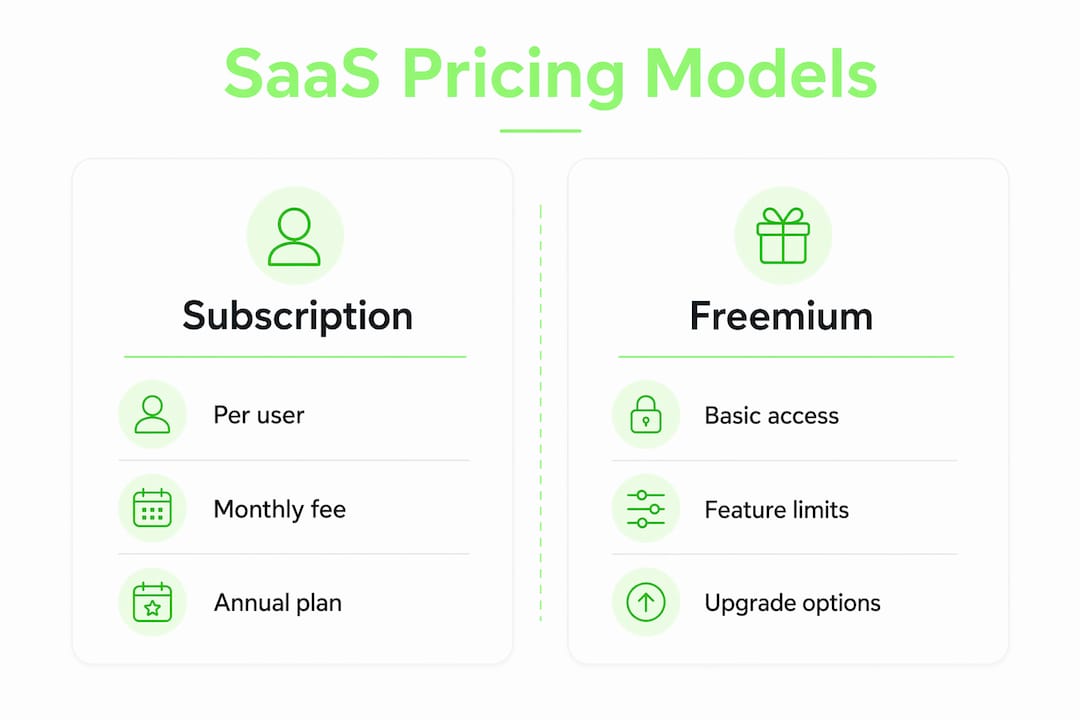
SaaS pricing typically follows one of three models:
Pricing Model | How it works |
|---|---|
Subscription (per seat) | Fixed monthly or annual fee per user. Predictable and common. Examples: Slack, Notion, HubSpot. |
Freemium | Core features free, premium features gated behind a paid tier. Examples: Zoom, Dropbox, Canva. |
Usage-based | You pay for what you consume. Examples: Twilio, AWS Lambda, Snowflake. |
Pro Tip: If you’re evaluating a SaaS tool , always check whether the pricing tier you can afford actually includes the features you need. Freemium plans are great for testing, but the features that matter are almost always behind the paywall.
The provider handles hosting, security patches, feature updates, and uptime. You handle configuration, user permissions, and how you use the data. That division of responsibility is the core of the SaaS operating model, and it’s worth understanding clearly before you commit to any platform.
What are the real benefits of SaaS for your business?
The most immediate benefit of SaaS is the shift from capital expenditure to operational expenditure. Instead of spending $50,000 upfront on a software license and the servers to run it, you pay $500 a month and scale up or down as your needs change. Subscription models facilitate faster business scaling precisely because they remove the financial inertia of large upfront investments.
For founders and small business owners, this is genuinely transformative. Here’s what that shift unlocks in practice:
Lower barrier to entry. Tools like Salesforce CRM, which once required enterprise budgets and IT departments, are now accessible to a solo founder for a few hundred dollars a month.
Automatic updates. You always run the latest version. No manual upgrades, no compatibility nightmares, no IT tickets.
Device and location independence. Work from your laptop in Austin or your phone in Tokyo. SaaS doesn’t care where you are.
Instant scalability. Add ten new team members? Add ten seats. Downsize? Remove them. No renegotiating licenses or decommissioning servers.
Enterprise-grade security by default. Multi-tenancy offers access to sophisticated security and disaster recovery infrastructure that most individual organizations could never afford to build themselves.
“The best SaaS tools don’t just replace a process. They remove the friction that was slowing you down without you even realizing it.”
The mobility advantage alone has reshaped how distributed teams operate. A five-person startup using Google Workspace, Notion, and Loom can collaborate with the same fluency as a 500-person enterprise. That democratization of capability is one of the most underappreciated forces in modern business.
Common SaaS pitfalls that catch founders off guard
SaaS is not a “set it and forget it” solution. The ease of adoption creates a false sense of security that trips up founders more often than any technical failure.
The most widespread trap is SaaS sprawl. Over-adopting SaaS tools causes organizations to lose budget control and data visibility faster than almost any other operational mistake. You sign up for one tool to solve a problem, then another, then another. Six months later you’re paying for twelve subscriptions, half of which overlap in functionality, and nobody on your team knows which one is the source of truth.
Here are the most critical pitfalls to watch for when adopting SaaS:
SaaS sprawl. Uncontrolled tool adoption fragments your data and inflates your costs. Audit your stack every quarter.
Vendor lock-in. If you build critical workflows inside a proprietary SaaS platform, switching later becomes painful and expensive. Always check data export options before you commit.
Data ownership blind spots. Discontinuing payment ends software and data access unless you’ve exported your data beforehand. Many founders discover this the hard way.
Limited customization. SaaS tools are built for broad audiences. If your workflow is highly specific, you may hit walls that a custom solution wouldn’t have.
Governance neglect. Neglecting active management of user permissions and data governance creates security risks even when the infrastructure itself is secure. Someone has to own this internally.
Integration friction. Not every SaaS tool plays nicely with every other. Before adopting a new platform, verify it integrates with your existing stack via native connectors or APIs.
Pro Tip: Before signing any annual SaaS contract, run a 30-day trial with your actual team on your actual workflows. Demos are optimized to impress. Real usage reveals the truth.
The governance point deserves extra emphasis. Many founders assume that because the SaaS provider handles infrastructure security, their data is automatically safe. It’s not. You still own the responsibility for who has access to what inside the application. That’s your job, not the vendor’s.
For a deeper look at managing these risks, SaaS risk management strategies for small businesses offer a practical framework worth bookmarking.
How to choose the right SaaS tools for your needs
Choosing SaaS tools without a framework is how founders end up with bloated, expensive, and disconnected tech stacks. The right approach starts with your business goals, not the tool’s feature list.
Start by asking: what specific outcome does this tool need to produce? Not “we need a CRM,” but “we need to track 200 leads through a five-stage pipeline and generate weekly conversion reports.” Specificity protects you from buying more than you need.
When evaluating any SaaS solution, work through these criteria:
Core feature fit. Does the tool do the specific thing you need, not just a version of it?
Vendor reliability. How long has the company been operating? What’s their uptime SLA? Check their status page history, not just their marketing copy.
Data policies. Where is your data stored? Who owns it? Can you export it in a standard format at any time?
Total cost of ownership. Add up the subscription fee, onboarding time, integration costs, and training time. The sticker price is rarely the real price.
Support responsiveness. Send a pre-sales question and time the response. That speed is usually a preview of what support looks like after you’ve paid.
Integration compatibility. Does it connect natively with your existing tools, or will you need a middleware solution like Zapier or Make?
The concept of hiring a partner, not a vendor applies directly here. The best SaaS relationships are ones where the provider’s success is genuinely tied to yours. Look for vendors who offer onboarding support, regular product updates, and transparent roadmaps.
Avoiding SaaS sprawl means strategically selecting tools that retain control over your business data and costs. The discipline is simple: adopt only what you will actually use, and retire what you don’t. For founders building from scratch, the best AI tools for founders in 2026 can help you identify which platforms actually move the needle versus which ones just look good in a demo.
Key takeaways
SaaS is the dominant software delivery model because it trades upfront cost and complexity for predictable, scalable, subscription-based access, but it demands active governance to deliver its full value.
Point | Details |
|---|---|
SaaS definition | Cloud-based software accessed via subscription, with no local installation required. |
Multi-tenancy advantage | Shared infrastructure lowers costs while delivering enterprise-grade security to all users. |
CapEx to OpEx shift | Subscription pricing replaces large upfront investments with predictable recurring costs. |
SaaS sprawl risk | Over-adopting tools fragments data and inflates costs; audit your stack every quarter. |
Data ownership | Stopping a subscription can end data access; always export critical data before canceling. |
Why I think most founders get SaaS backwards
Here’s the uncomfortable truth I’ve observed working with founders at every stage: most people adopt SaaS tools reactively, not strategically. They see a problem, Google a solution, sign up for a free trial, and then forget to cancel when it doesn’t stick. Multiply that by a team of ten over two years, and you’ve got a sprawling, expensive mess with no clear owner.
The founders who get SaaS right treat their tool stack like a product decision, not a procurement task. They ask the same questions they’d ask about a hire: What’s the job to be done? What does success look like in 90 days? What’s the exit plan if this doesn’t work?
I’ve also seen the opposite failure: founders who are so cautious about SaaS costs that they under-invest in tools that would genuinely accelerate their growth. There’s a real cost to doing things manually that never shows up on a spreadsheet. The goal isn’t to minimize SaaS spend. It’s to maximize the return on every dollar you commit.
The governance piece is where I see the most consistent blind spots. SaaS users must manage configuration, permissions, integrations, and data governance internally, and most early-stage teams simply don’t assign ownership of this until something goes wrong. Assign someone to own your SaaS stack from day one. It doesn’t have to be a full-time role, but it has to be someone’s responsibility.
— Samim
Build smarter with Siift before you commit to any SaaS stack
Before you sign another annual SaaS contract, it’s worth pressure-testing your decision against your actual business strategy. Siift is the agentic AI platform built specifically for founders who want to move with clarity and confidence, not guesswork. Siift guides you step-by-step through ideation, validation, and go-to-market, helping you identify which tools genuinely serve your strategy and which ones are just noise. Instead of adopting SaaS tools because everyone else is using them, you can validate your choices against a structured, data-driven view of your business. Explore Siift’s founder platform and start building your stack with intention, not impulse.
FAQ
What is the SaaS definition in simple terms?
SaaS, or Software as a Service, is a model where software is hosted in the cloud and accessed via the internet on a subscription basis, with no local installation required. The provider manages all infrastructure, updates, and security.
How does SaaS differ from traditional on-premise software?
On-premise software is installed and maintained on your own servers, requiring upfront licensing costs and internal IT management. SaaS shifts those responsibilities to the provider and replaces upfront costs with recurring subscription fees.
What are common examples of SaaS applications?
Widely used SaaS applications include Salesforce for CRM, Google Workspace for productivity, Slack for team communication, HubSpot for marketing, and Zoom for video conferencing.
What is SaaS pricing and how does it work?
SaaS pricing follows three main models: per-seat subscriptions (a fixed fee per user), freemium tiers (basic access free, premium features paid), and usage-based billing (pay for what you consume). Most business tools use the per-seat model.
What happens to my data if I cancel a SaaS subscription?
Stopping a subscription typically ends both software access and data access immediately. Always export your data in a portable format before canceling any SaaS service.